


Which visual editing tools best achieve ‘Artistry Enhanced’ photo quality for beauty swatches?
The Quest for ‘Artistry Enhanced’ Beauty Swatches
In the vibrant world of beauty content, visual appeal is paramount. For beauty bloggers, influencers, and brands, high-quality swatch photography isn’t just a nicety; it’s a necessity. It’s the difference between a product that flies off the virtual shelves and one that gets overlooked. Achieving ‘Artistry Enhanced’ photo quality for beauty swatches means going beyond a simple, well-lit shot. It involves meticulous editing to ensure true-to-life color representation, crisp texture, and an overall polished aesthetic that captivates and informs the audience.
This article delves into the top visual editing tools available today, examining their strengths and how they can be leveraged to elevate your beauty swatch photography to an unparalleled artistic standard.
Defining ‘Artistry Enhanced’ Quality
Before we explore the tools, let’s clarify what ‘Artistry Enhanced’ means in the context of beauty swatches. It encompasses:
- Color Fidelity: The swatch color on screen must accurately reflect the real-life product, free from color casts or oversaturation.
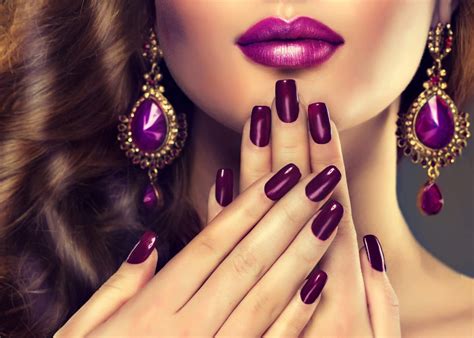
- Texture Clarity: The unique finish of the product—be it matte, satin, glitter, or glossy—should be visibly clear and appealing.
- Natural Skin Tones: If swatched on skin, the underlying skin tone should appear natural and not distorted by product color or lighting.
- Balanced Lighting: Highlights and shadows should be optimized to showcase the product without obscuring details.
- Cleanliness and Consistency: Swatches should be free of imperfections, and a consistent look across multiple swatches builds trust and brand identity.
Desktop Powerhouses for Precision
For professional-grade results and intricate control, desktop software remains the gold standard.
Adobe Photoshop: The Industry Standard
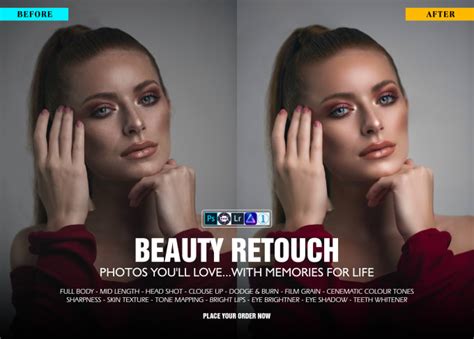
Strengths: Unmatched for precision retouching, layering, advanced color grading, and complex composites. Photoshop offers an arsenal of tools for cloning, healing, frequency separation for skin, and masking for intricate selections. For beauty swatches, it’s invaluable for minor blemish removal, precise color correction (e.g., using Selective Color or Curves), sharpening details without introducing noise, and creating consistent backgrounds.
Adobe Lightroom: Efficiency and Workflow
Strengths: Lightroom excels in batch processing, non-destructive editing, and comprehensive color correction. Its intuitive interface makes it ideal for managing large libraries of photos. Key features for beauty swatches include robust white balance controls, HSL (Hue, Saturation, Luminance) adjustments for fine-tuning specific colors, localized adjustments for exposure or clarity, and custom presets to maintain consistency across a series of swatches. It’s perfect for laying the foundational ‘Artistry Enhanced’ look.

Affinity Photo & Capture One: Robust Alternatives
- Affinity Photo: A powerful, one-time purchase alternative to Photoshop, offering many of its core features including layers, masks, and advanced retouching. It’s a fantastic option for those seeking professional capabilities without a subscription model.
- Capture One: Renowned for its superior RAW processing engine, tethered shooting capabilities, and exceptional color handling. Many professional photographers choose Capture One specifically for its ability to render accurate and vibrant colors, which is crucial for beauty product photography. Its sophisticated color editor allows for incredibly precise adjustments.
Mobile Solutions for On-the-Go Excellence
While desktop tools offer maximum control, mobile editing apps have come a long way, providing convenient and effective solutions for quick edits and social media-ready content.
- Snapseed: Google’s powerful mobile editor offers a wide range of tools, from selective adjustments and healing brushes to advanced exposure and color controls. Its intuitive interface makes detailed edits accessible on a small screen.
- VSCO: Popular for its high-quality filters and subtle editing tools. VSCO can quickly add a cohesive aesthetic to your swatch photos, though less about technical correction and more about mood.
- Facetune/Airbrush: While often associated with selfies, these apps can be useful for minor, subtle retouching of skin around swatches (e.g., smoothing, blemish removal) with a light hand, to maintain a natural look. Overuse can lead to an unnatural, airbrushed effect, which should be avoided for swatch accuracy.

Essential Techniques for Elevating Swatch Photos
Regardless of the tool you choose, certain techniques are universal for achieving ‘Artistry Enhanced’ quality:
- Accurate White Balance: This is fundamental. Correct white balance ensures true colors. Use a grey card during shooting or precisely adjust it in editing.
- HSL (Hue, Saturation, Luminance) Adjustments: Fine-tune individual color ranges to ensure the product’s color is spot-on without affecting other tones (e.g., skin).
- Clarity and Texture Enhancement: Use the Clarity or Texture sliders sparingly to bring out the product’s finish without making it look artificial or gritty.
- Subtle Retouching: Address any dust, stray hairs, or minor skin imperfections with healing and cloning tools, always aiming for a natural, clean look.
- Lighting and Exposure Optimization: Adjust highlights, shadows, and overall exposure to ensure the swatch is perfectly lit and details are visible. Avoid blown-out highlights or crushed shadows.
- Consistency through Presets: Develop a signature editing style and save it as a preset to apply consistently across all your swatch photos, building a recognizable brand aesthetic.
Choosing Your Ideal Editing Companion
The best tool depends on your specific needs, skill level, and budget. For absolute precision and professional output, a combination of Lightroom (for workflow and initial color correction) and Photoshop (for detailed retouching) is often preferred. Capture One stands out for its superior color science. For those on a budget, Affinity Photo offers a powerful one-time purchase solution, while mobile apps provide excellent convenience for quick, impactful edits.
Many content creators find success by using a primary desktop tool for foundational edits and color work, then porting images to a mobile app for specific stylistic filters or last-minute adjustments before posting.
Conclusion: Beyond the Pixels
Achieving ‘Artistry Enhanced’ photo quality for beauty swatches is a blend of mastering your chosen editing tools and developing an artistic eye. While software provides the technical means, understanding color theory, composition, and what makes a swatch truly pop will ultimately define your success. Invest time in learning the nuances of your preferred editing suite, experiment with different techniques, and always strive for authenticity and visual excellence to truly captivate your beauty audience.